Chapter 5
Theming and Editions
Styling comes from design tokens rather than stylesheet strings. FOP is not a CSS engine, and Smia does not pretend it is.
theme.edn
Define the theme once in theme.edn at the book root, beside book.edn. The split: book.edn is the manuscript, theme.edn is the appearance. Tokens are grouped into :color, :type, :spacing, and :layout:
{:color  {:text "#1c1c1c" :link "#2a52be"}
 :type   {:body-family "serif" :base-size "11pt"}
 :spacing {:paragraph "6pt"}
 :layout {:page-size :digest :margin-outside "20mm"}}
The same file drives every output format. For paged output the tokens compile into the FO properties carried by every block, for HTML output into a generated stylesheet. Missing tokens fall back to readable defaults. :layout is page geometry and applies to paged output only; :page-size is one of :a4, :letter, or :digest.
Code listings size with :type {:code-size "9pt"}, the point size of block code in the PDF editions. Monospace faces carry a large x-height, so on a small page a smaller code size keeps listings from wrapping; the manual, set in a digest trim, uses 8pt. The site sizes code relative to the reading text and is unaffected.
Syntax highlighting is two more tokens. Set :type {:highlight true} to enable it, and override the palette with a :code group mapping token kinds to colors: :keyword, :string, :comment, :number, and :literal.
Smart punctuation is also a :type token. It is on by default; :type {:smart-punctuation false} keeps typewriter punctuation as typed. The Markdown chapter describes what it rewrites.
Book typography
The PDF editions set their pages the way books have been set since long before software: justified, hyphenated text; running paragraphs marked by a first-line indent rather than a gap, with the first paragraph after a heading set flush; page margins constructed from the trim in the classical 2:3:4:6 proportion, smallest at the binding and largest at the foot; heading space counted in whole and half lines of the body leading. All of it is on by default and all of it is tokens, so a book that wants the web’s conventions instead can have them back one token at a time.
:type carries the text-level controls:
:type {:justify true            ;; false for ragged-right
       :hyphenate true          ;; false to never break words
       :hyphenation-ladder 2    ;; max consecutive hyphenated lines
       :widows 2 :orphans 2     ;; min lines of a paragraph per page
       :running-head {:letter-spacing "0.08em"}}
Hyphenation needs to know the book’s language to pick its patterns, so set :book/language in book.edn (the configuration chapter). The :running-head map restyles the letterspaced-capitals head per property.
:spacing decides how paragraphs and headings claim vertical space:
:spacing {:paragraph-style :indent  ;; :space for gap-separated paragraphs
          :indent "1em"             ;; the first-line indent
          :heading-rhythm {:h2 [1.5 0.5]}}
With the default :indent style, running paragraphs indent their first line and the gap between them collapses; a paragraph opening a run, after a heading, a list, or a figure, sets flush (no first-line indent). :space restores the gap-and-no-indent web convention. :heading-rhythm maps a heading level to its [space-before space-after] in multiples of the body leading, merged over the defaults.
:layout carries the page geometry. With no margin keys the margins derive from the trim: inner, top, outer, and bottom in the ratio 2:3:4:6, sized so the text block covers two thirds of the page width, a construction early printers drew with a straightedge.1 Any explicit margin key wins for that key alone, :text-coverage tunes the derivation, and :chapter-drop sets the white space above a chapter’s opening heading:
:layout {:page-size :digest
         :text-coverage 2/3
         :chapter-drop "72pt"}
Figure 1 draws the construction on the digest trim. One unit is a ninth of half the page width; the inner margin takes two, the top three, the outer four, and the foot six, so the two text blocks sit high and toward the spine, and the facing pages mirror:
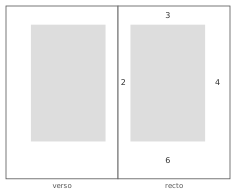
This manual’s own theme.edn declares no margins; the pages you are reading in the PDF editions are the derived canon, exactly the figure’s geometry. Everything in this section is paged-output styling: the site and the EPUB read none of these tokens, keep their gap-separated ragged-right paragraphs, and are byte-identical with or without them.
Styling escape hatches
When the tokens cannot express a styling need, theme.edn takes two optional override groups. Both are data, and they mirror the content escape hatches. Content and styling follow the same matrix:
| Portable | PDF output | HTML output | |
|---|---|---|---|
| Content | sugar + book extensions | [:fo/* …] Hiccup | [:html/* …] Hiccup |
| Styling | design tokens | :fo group | :css group |
:fo maps a tag to FO properties merged over the compiled style for that tag:
:fo {:h1 {:space-before "24pt"}
     :blockquote {:font-style "normal"}}
:css is a vector of [selector property-map] rules appended after the generated stylesheet, so they win on equal specificity:
:css [["p.fancy" {:color "#bada55"}]
      [".hero"   {:padding "2em"}]]
A rule may also be an at-rule wrapper holding plain rules one level deep, such as a media query for the site or a print rule:
:css [["@media (max-width: 40em)"
       [".hero" {:padding "1em"}]]]
Nobody writes raw FO, HTML, or CSS strings. The serializers are internal, and all four cells of the matrix are plain data.
Editions
The same manuscript builds into editions, the deliverable forms of the book: screen and print PDFs, a press-ready PDF/X, a static site, and an EPUB. One theme styles them all. Both PDF editions build by default; select a subset by repeating --edition on the command line, or with :editions in the API. The editions chapter describes each edition, and the commands chapter the flags.
Site layout
The :site edition can present its pages in more than one layout. A layout is the page chrome, the framing around each chapter’s content, and you pick one with a single token:
:site {:layout :sidebar}Two layouts ship today:
:plain, the default: one centered reading column with a contents link and prev/next navigation at the foot of each page. A book that sets no:sitegroup gets it.:sidebar: a two-column layout with a table-of-contents rail beside the reading column, the current page marked. The page you are reading online uses it. The rail styles its entries as quiet text rather than underlined links, groups the chapters under small part labels, and accents the current page. Because the rail already lists every page, the home page is a plain title card rather than a second copy of the contents.
Both layouts are pure HTML and CSS with no JavaScript, and both render the same manuscript: switching is a one-line change to theme.edn, and nothing in the chapters moves. On a narrow screen the rail folds into a compact, closed Contents disclosure at the top of the page, a native details element with still no JavaScript, and the margin chevrons yield to the labeled prev/next at the foot, so nothing overflows a phone screen. In both, the navigation chrome reads as quiet text, leaving the underline a signal for links in the prose, and every control draws a visible focus ring for keyboard readers. The reading column sets its width fluidly, and the few hover transitions collapse to nothing for a reader whose system asks for reduced motion.
Layouts are a set keyed by name. A value outside the known set fails the build with :smia.site.layout/unknown-layout, naming the layout it did not recognize.
Site search
A second :site token turns on reader search:
:site {:layout :sidebar
       :search true}
With it, every page carries a search box. As the reader types, a small script suggests matches grouped by what they are (chapters, sections, figures, tables, listings, index terms) straight from the book’s own apparatus. The index is a static search-index.json the build writes beside the pages; nothing runs on a server, and the index is as deterministic as every other artifact.
The box is progressive enhancement, not a requirement: it is a plain form, and with JavaScript disabled (or the script unreachable) submitting it lands on a static search/ page listing the book by category, every page still one click away. The script is a ClojureScript island the build compiles on demand, on the JVM behind the optional :cljs alias (the commands chapter), with no JavaScript toolchain involved. The default remains off: a book that does not opt in ships a site with no JavaScript at all. The page you are reading has it on; the manual’s own theme.edn is the example above.
Dark mode
A third :site token adds a dark color scheme to the site:
:site {:dark true}The site stylesheet defines its colors as CSS custom properties, and the build appends an @media (prefers-color-scheme: dark) block that redefines them, so the page honors the reader’s operating-system setting with no toggle and no JavaScript. Because every color is a variable, the dark scheme flips the whole palette at once, not just the page background: headings, chapter labels, captions, sidebar, and syntax colors are all included.
A computed dark palette is the default, including a brighter syntax-highlight palette and lighter code line numbers so listings stay readable on the dark code background. Override any of its colors (:text, :background, :link, :muted, :rule, :code-background, :panel, :panel-2, :card) with a :dark token group, and recolor syntax highlighting for the dark scheme under :dark {:code …}:
:site {:dark true}
:dark {:background "#0d1117" :text "#e6edf3"
       :code {:keyword "#ff7b72" :string "#a5d6ff"}}
Build-time SVG, both math and diagrams, renders identical bytes into every edition, so it cannot be recolored for the dark scheme. The site instead inverts its lightness in CSS while keeping its hue, so a black-on-transparent diagram reads as light strokes on the dark page and a colored diagram stays recognizable. This is a site dark-scheme effect only; the SVG itself is untouched.
The custom-property layer is the site’s alone; the EPUB keeps a literal stylesheet, since e-readers do their own theming and older ones support custom properties unevenly. A book that does not opt in emits exactly the same stylesheet as before.
A reader-controlled toggle
The default follows the operating system. To add a button that lets the reader override it, set :dark to a map with :toggle:
:site {:dark {:toggle true}}This adds a small ClojureScript island, compiled on demand and shipped on the page. It records the reader’s choice in the browser’s localStorage and reflects it on the page, so an explicit choice overrides the system setting and survives across pages and visits. The script loads ahead of first paint, so a stored choice applies with no flash of the wrong scheme. The page is still hosted as plain static files, with nothing running on a server.
With JavaScript disabled the button stays hidden and nothing breaks: the operating-system setting still governs through the media query, exactly as :dark true alone behaves. The toggle is the only part of dark mode that uses JavaScript; the color scheme itself never needs it. Palette overrides under the :dark token group apply to both the system scheme and the explicit choice.
Reader controls
A fourth :site token gives the reader a small cluster of preference controls:
:site {:reader true}It adds a compact control to the page corner that opens a panel of reading preferences: the column width, the text size, a high-contrast variant, and a focus mode that hides the chrome to leave only the text. When dark mode is also on, the panel folds in a color-scheme control too, so a book that sets both :dark true and :reader true gets one cluster rather than a separate dark-mode button. The page you are reading online has it on.
The stylesheet expresses the reading width and text scale as custom properties (--reading-width, --reading-scale) and the high-contrast variant as a data-contrast attribute, all with the same defaults the page already uses, so a reader who changes nothing sees no difference. A small ClojureScript island, compiled on demand, reads each choice from localStorage, reflects it on the page ahead of first paint, and records it across pages and visits. A reset control at the foot of the panel forgets every stored choice and returns the page to its defaults. As with the dark toggle, the page is still plain static files.
With JavaScript disabled the cluster stays hidden and nothing breaks: the defaults govern, and the column, text size, and contrast are exactly what every reader gets without the controls. The controls are the only part that uses JavaScript; the preferences are ordinary CSS underneath.
The token also adds a quiet Part › Chapter breadcrumb atop each chapter, built from the book’s own structure as plain HTML, and a thin reading-progress bar along the top of the window. The breadcrumb is a small signpost in normal reading and the only one once focus mode takes the chrome away; the progress bar tracks how far through the chapter the reader has scrolled, and like the controls it stays hidden without JavaScript.
Keyboard shortcuts
A fifth :site token binds a small set of reading shortcuts:
:site {:keyboard true}The shortcuts act on controls and links the page already carries, so each has a visible equivalent and nothing is keyboard-only:
| Key | Action |
|---|---|
← →, h l | Previous / next page |
/ | Focus the search box |
d | Toggle dark mode |
f | Toggle focus mode |
g | Go to the contents |
? | Show the shortcut help |
Page navigation takes the arrow keys and the vim-style letters, so it works the same on a keyboard layout that buries the bracket keys behind a modifier. Pressing ? opens a help dialog listing the shortcuts; Escape, a click outside, or its close button dismisses it. Keystrokes are ignored while the reader is typing in a field, so the search box and any form inputs behave normally. A small ClojureScript island, compiled on demand, binds the keys and reveals the dialog. With JavaScript disabled none of it loads, and every action stays reachable by its visible control. The page you are reading online has it on.
Mermaid diagrams
A :site {:mermaid true} token turns on client-rendered Mermaid diagrams (a mermaid fence, see book production). Each diagram is emitted as a <pre class="mermaid"> block and a small island script renders it in the browser; with JavaScript disabled, the source shows. The Mermaid library is not bundled. Point the build at one with :site {:mermaid {:src "…"}}, a URL to a Mermaid build that the page loads ahead of the island. The PDF and EPUB editions always show the diagram’s source instead, so reach for a plantuml fence when a diagram must be drawn in every edition. The default is off, and a book that does not opt in ships no Mermaid script.
Fonts
With no font configuration, PDF output uses the base-14 font families. A book that needs its own faces registers them through the :book/print-x map in book.edn, described in the editions chapter. Registered fonts are embedded in every PDF edition, and the theme’s :type families lead with the registered names, falling back to the generics. A list like "Crimson Text, serif" works as both an FO font-family and a CSS one. Smia bundles no fonts; the manual’s manuscript ships its own under the SIL Open Font License, beside the files.
- Jan Tschichold reconstructed the canon in his essays on book form, building on J. A. van de Graaf’s analysis of how late medieval books divided the page. ↩